
Home Settings Overview

The Home Settings page is a custom section designed for managing key information that appears on the website’s homepage. Here’s how each field works and what it controls
Show Date

- Field: Show Date from Till Use this field to set the overall event dates (e.g., “February 21 – March 2, 2025”). This will be displayed prominently on the homepage.
- Field: Event Countdown Select the end date and time for the event countdown timer. The timer will automatically calculate and display the remaining time until the event starts.
Tickets
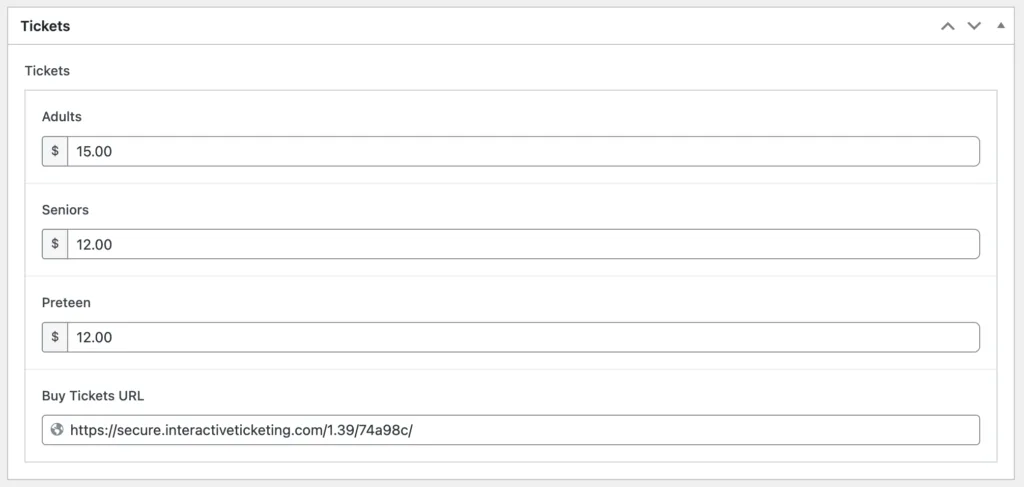
- Fields: Ticket Prices (Adults, Seniors, Preteen) Enter the ticket prices for each category. These values are displayed in the ticketing section on the homepage.
- Field: Buy Tickets URL Add the link to the external ticket purchase page. Ensure this URL is always up-to-date.
Opening Hours

These fields allow you to set the opening and closing hours for each day of the event. The format is clear and allows you to manage hours for specific days (e.g., Friday – Sunday).
Important Notes
- After making changes, always click Update to ensure your edits are saved and reflected on the frontend.
- Only users with access to this settings page should modify these fields to maintain consistency on the homepage.